 Mon - Sat 8:00 - 6:30, Sunday - CLOSEDMon - Sat 8:00 - 6:30, Sunday - CLOSED
 Send Email
 USB Speakerphone
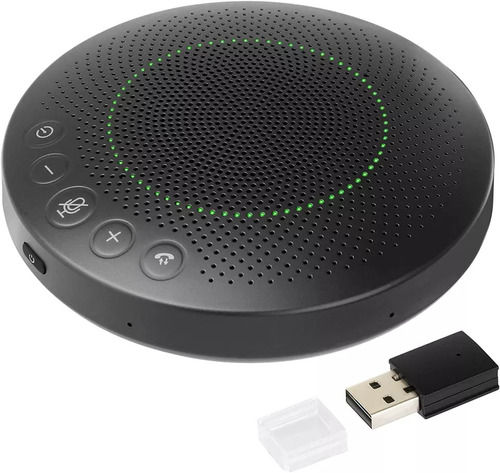
Product Details:
- Power Rating 2W
- Usage & Applications Conference Calls, Online Meetings, VoIP Calls, Remote Work
- Rated Voltage 5V DC (USB Powered)
- Operating Temperature 0C to 40C
- Cable Type USB Cable
- Phase Single Phase
- Material ABS Plastic
100 USD ($)/Piece
X
USB Speakerphone Price And Quantity
- 500 Piece
- 100 USD ($)/Piece
- High-Definition Mono Sound
- 1.2 meters
- Omnidirectional
- 120 mm x 120 mm x 40 mm
- Wired (USB)
- Black
- Windows, Mac, Linux
- Mute, Volume Up/Down, Call Answer/End
- 190 grams
USB Speakerphone Product Specifications
- 500 mA
- Conference Calls, Online Meetings, VoIP Calls, Remote Work
- Single Phase
- Built-in Microphone, Plug and Play, Echo Cancellation, Noise Reduction, Compact Design, Portable
- 100 Hz 16 kHz
- 2W
- 0C to 40C
- ABS Plastic
- Copper
- 5V DC (USB Powered)
- USB Cable
- High-Definition Mono Sound
- 1.2 meters
- Omnidirectional
- 120 mm x 120 mm x 40 mm
- Wired (USB)
- Black
- Windows, Mac, Linux
- Mute, Volume Up/Down, Call Answer/End
- 190 grams
USB Speakerphone Trade Information
- Cash on Delivery (COD), Days after Acceptance (DA), Letter of Credit (L/C), Telegraphic Transfer (T/T), Paypal, Cash in Advance (CID)
- 1000 Piece Per Day
- 20 Days
- Yes
- Sample costs shipping and taxes has to be paid by the buyer
- Australia, North America, Eastern Europe, Middle East
- All India
Product Description
360 Voice Pickup and 6 Microphone: omnidirectional microphone which can pick up your voice loud & clear. Built in 6 microphone array with voice pickup range up to 3 meters. Automatically reduce noise in the background for clear conversation. Great ideal for Dragon speaks Online courses, Skype chat, call center, conference calls, webinar presentations, and more.
Superior Audio for Clear Communication
Equipped with an omnidirectional microphone and advanced echo cancellation, this USB speakerphone ensures crisp, intelligible audio during every conversation. Its high-definition mono output covers the entire room, facilitating effortless, reliable communication whether you're in a team meeting or a solo session.
Effortless Compatibility and Portability
Designed to be plug and play, this device is compatible with major operating systems, including Windows, Mac, and Linux. Its lightweight frame and compact size, combined with a robust USB-powered design, make it easy to transport for professional use anywhere you go.
FAQ's of USB Speakerphone:
Q: How do I connect the USB speakerphone to my computer?
A: Simply plug the included 1.2-meter USB cable into your computer's USB port. The speakerphone will automatically install and is ready for immediate use without the need for additional drivers or software.Q: What types of applications is this speakerphone best suited for?
A: It is ideal for conference calls, online meetings, VoIP communications, and remote work, providing clear sound quality and seamless integration with widely used platforms and operating systems.Q: When should I use the mute or call control buttons?
A: Use the mute button whenever you wish to temporarily disable your microphone during a call. The call answer/end button lets you pick up or hang up calls directly from the speakerphone, offering convenient control during your sessions.Q: Where can this speakerphone be used effectively?
A: Its compact and portable design allows for use in both office and home environments. Its solid construction also makes it suitable for travel, easily fitting into bags or briefcases for meetings on the go.Q: What is the process for setting up the speakerphone after purchase?
A: To set up, unbox the device, connect it to your computer via the USB cable, and wait a few moments for automatic installation. Once ready, select the speakerphone as your audio device within your conferencing software.Q: How does the built-in noise reduction benefit my calls?
A: The speakerphone's noise reduction feature minimizes background sounds, ensuring that your voice remains clear and undistorted. This results in professional and productive communication, even in busy environments.Tell us about your requirement

Price:
Quantity
Select Unit
- 50
- 100
- 200
- 250
- 500
- 1000+
Additional detail
Mobile number
Email

Other Products in 'Consumer Electronics' category



Contact Details

- 901, Building No.7C, West Port New Territories, No.206, Zhenhua Road, Hangzhou - 310013, Zhejiang, China
CHINA TOP WELL LIMITED

- Mr Vakul Agarwal (Proprietor)
- Mobile : +8615258831784
- Phone : 86-571-81060617
-
 Send Inquiry
 Send Inquiry
 Send Inquiry

CHINA TOP WELL LIMITED
All Rights Reserved.(Terms of Use)
Developed and Managed by Infocom Network Private Limited.
Developed and Managed by Infocom Network Private Limited.
 English
 Spanish
 French
 German
 Italian
 Chinese (Simplified)
 Japanese
 Korean
 Arabic
 Portuguese